关于DevOps落地方案的个人观点
引言:
DevOps(Development和Operations的组合词)是一组过程、方法与系统的统称,用于促进开发(应用程序/软件工程)、技术运营和质量保障(QA)部门之间的沟通、协作与整合。

DevOps(Development和Operations的组合词)是一组过程、方法与系统的统称,用于促进开发(应用程序/软件工程)、技术运营和质量保障(QA)部门之间的沟通、协作与整合。
sed:Stream Editor文本流编辑,sed是一个“非交互式的”面向字符流的编辑器。能同时处理多个文件多行的内容,可以不对原文件改动,把整个文件输入到屏幕,可以把只匹配到模式的内容输入到屏幕上。还可以对原文件改动,但是不会再屏幕上返回结果。
ls -lh $(find /home -type f -size +100M) #查找指定目录下文件的大小

ls -lh $(find /home -type f -size +10M -a -size -100M)# 查找大于10M且小于100M的文件

find / -name "*.mp3" -type f -size +100M |xargs rm -rf #删除单个文件超过100M的MP3文件
获取指定目录的绝对地址
大家可能对top监控软件比较熟悉,今天我为大家介绍另外一个监控软件Htop,姑且称之为top的增强版,相比top其有着很多自身的优势。如下:
This system is not registered to Red Hat Subscription Management. You can use subscription-manager to register.
rpm -aq|grep yum|xargs rpm -e --nodeps
到这个网站去下载如下RPM包 :http://mirrors.163.com/centos/7/os/x86_64/Packages/
此文档来源于Jermine的个人blog : https://jermine.vdo.pub/linux/ubuntu-16.04-reinstall-cuda/
注意 : 由于tensorflow的GPU版本依赖nvidia的cuda、cudnn库,因此一般需要包含cuda和cudnn的链接库文件,普遍做法是通过主机安装cudnn、cuda的方式。这里还有另外两种方式可以选择:
按如下步骤进行安装:
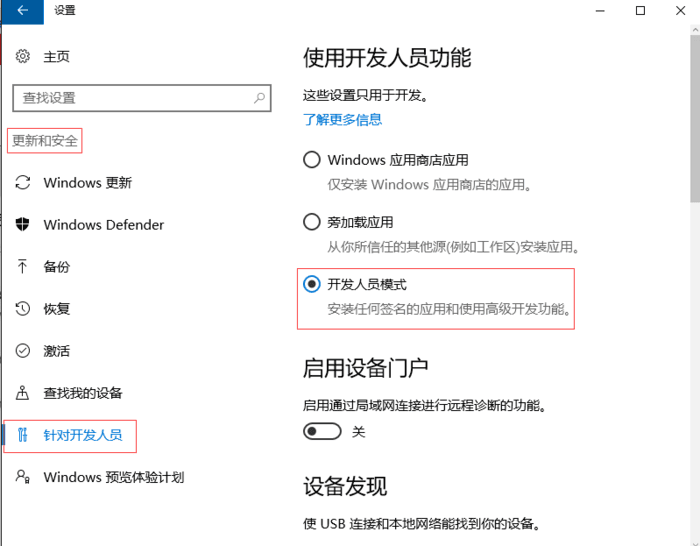
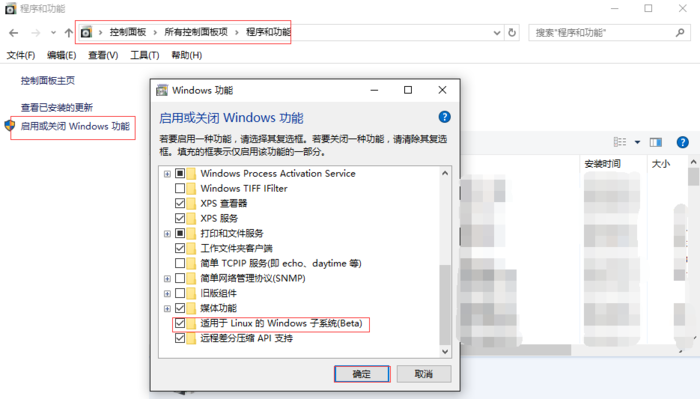
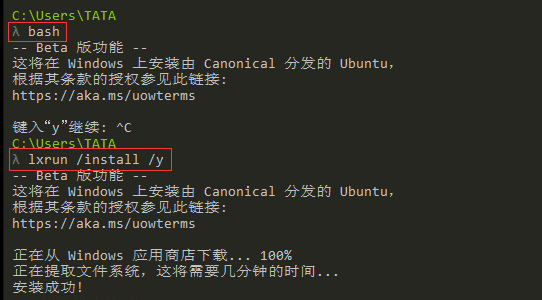
系统升级到一周年正式版及以上(1607)
依次在 设置 - 更新与安全 - 针对开发人员 选项中,启用"开发人员模式"
最近在学习虚拟化相关的知识,遇到远程桌面协议,就简单整理了下找到的资料,目前常用的协议有VNC/SPICE/RDP三种,就在这里做一个简单的介绍。
docker run --runtime=nvidia --restart=always --name tensorflow -dit -v `pwd`:/app -w /app nvidia/cuda:9.0-cudnn7-runtime-ubuntu16.04
docker exec -it tensorflow bash
Jermine@ubuntu:~$ cat > /etc/apt/sources.list

deb http://mirrors.aliyun.com/ubuntu/ xenial main restricted universe multiverse
deb http://mirrors.aliyun.com/ubuntu/ xenial-security main restricted universe multiverse
deb http://mirrors.aliyun.com/ubuntu/ xenial-updates main restricted universe multiverse
deb http://mirrors.aliyun.com/ubuntu/ xenial-backports main restricted universe multiverse
##测试版源
deb http://mirrors.aliyun.com/ubuntu/ xenial-proposed main restricted universe multiverse
sudo apt-get update
# 导入环境变量
 TENSORFLOW_VERSION=1.7.0

 apt-get update -y  && apt-get install -y --no-install-recommends python3 python3-pip  protobuf-compiler;\
    pip3 install --upgrade pip ;\
    python3 -V && pip3 -V ;\
    pip3  --no-cache-dir install setuptools  ;\
    pip3 --no-cache-dir install  \
    https://storage.googleapis.com/tensorflow/linux/gpu/tensorflow_gpu-${TENSORFLOW_VERSION}-cp35-cp35m-linux_x86_64.whl ;\
    apt-get autoremove && apt-get autoclean ;\
    rm -rf /var/lib/apt/lists/*
import numpy as np
np.random.seed(0)
import tensorflow as tf
import time

N,D = 6000,8000

with tf.device('/cpu:0'):
    x = tf.placeholder(tf.float32)
    y = tf.placeholder(tf.float32)
    z = tf.placeholder(tf.float32)

    a = x * y
    b = a + z
    c = tf.reduce_sum(b)

grad_x, grad_y, grad_z = tf.gradients(c, [x,y,z])

start_time = time.time()
with tf.Session() as sess:
    values = {
        x: np.random.randn(N, D),
        y: np.random.randn(N, D),
        z: np.random.randn(N, D),
    }
    out = sess.run([c, grad_x, grad_y, grad_z],
                   feed_dict=values)
    c_val, grad_x_val, grad_y_val, grad_z_val = out
elapsed = time.time() - start_time
print(time.strftime("%H:%M:%S", time.gmtime(elapsed)))
print("exit 0")
将其存为 test_gpu_for_tensorflow.py , 使用 python3 test_gpu_for_tensorflow.py 执行结果如下:
Remmina 是一款在 Linux 和其他类 Unix 系统下的自由开源、功能丰富、强大的远程桌面客户端,它用 GTK+ 3 编写而成。它适用于那些需要远程访问及使用许多计算机的系统管理员和在外出行人员。