Nvidia Docker可以指定GPU以及数量
docker可以指定GPU以及数量操作如下:
docker调用GPU时可以明确指定用哪一张显卡,同时也可以指定数量
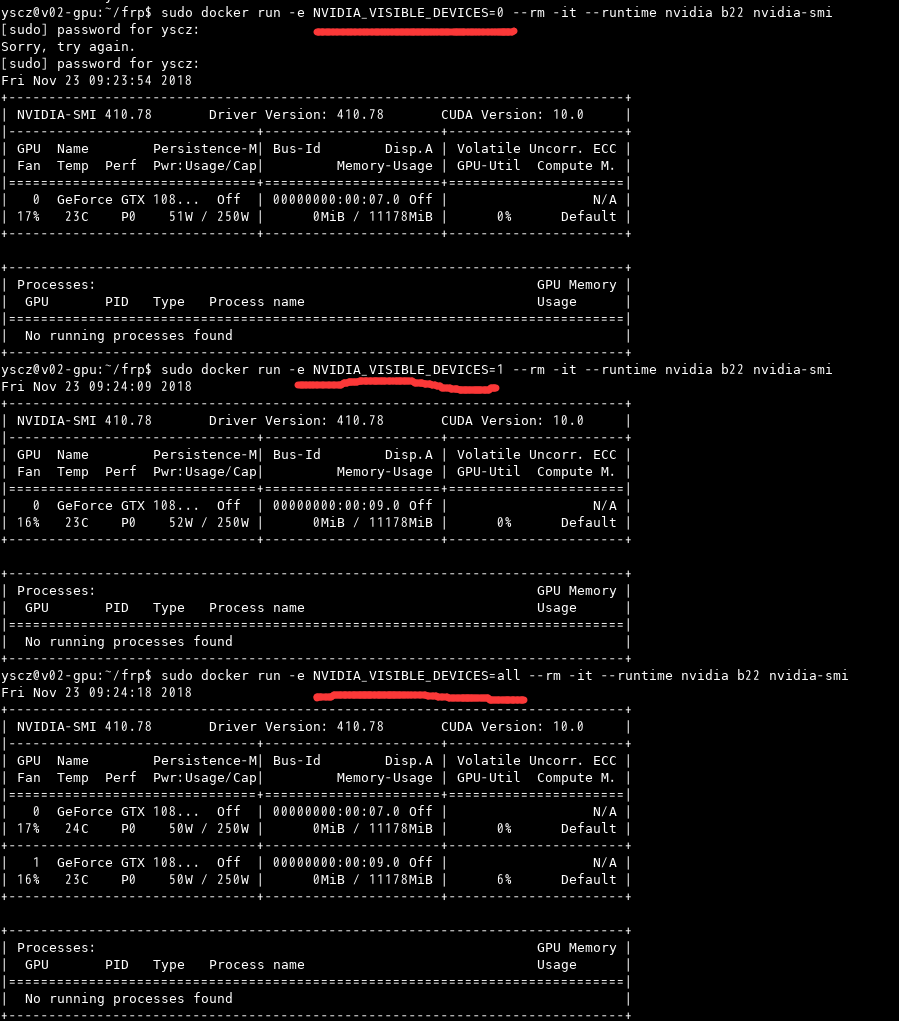

docker调用GPU时可以明确指定用哪一张显卡,同时也可以指定数量
InfluxDB是一个开源的时序数据库,使用GO语言开发,特别适合用于处理和分析资源监控数据这种时序相关数据。而InfluxDB自带的各种特殊函数如求标准差,随机取样数据,统计数据变化比等,使数据统计和实时分析变得十分方便。在我们的容器资源监控系统中,就采用了InfluxDB存储cadvisor的监控数据。本文对InfluxDB的基本概念和一些特色功能做一个详细介绍,内容主要是翻译整理自官网文档,如有错漏,请指正。
此文档来源于Jermine的个人blog : https://jermine.vdo.pub/linux/ubuntu-16.04-reinstall-cuda/
注意 : 由于tensorflow的GPU版本依赖nvidia的cuda、cudnn库,因此一般需要包含cuda和cudnn的链接库文件,普遍做法是通过主机安装cudnn、cuda的方式。这里还有另外两种方式可以选择:
docker run --runtime=nvidia --restart=always --name tensorflow -dit -v `pwd`:/app -w /app nvidia/cuda:9.0-cudnn7-runtime-ubuntu16.04
docker exec -it tensorflow bash
Jermine@ubuntu:~$ cat > /etc/apt/sources.list

deb http://mirrors.aliyun.com/ubuntu/ xenial main restricted universe multiverse
deb http://mirrors.aliyun.com/ubuntu/ xenial-security main restricted universe multiverse
deb http://mirrors.aliyun.com/ubuntu/ xenial-updates main restricted universe multiverse
deb http://mirrors.aliyun.com/ubuntu/ xenial-backports main restricted universe multiverse
##测试版源
deb http://mirrors.aliyun.com/ubuntu/ xenial-proposed main restricted universe multiverse
sudo apt-get update
# 导入环境变量
 TENSORFLOW_VERSION=1.7.0

 apt-get update -y  && apt-get install -y --no-install-recommends python3 python3-pip  protobuf-compiler;\
    pip3 install --upgrade pip ;\
    python3 -V && pip3 -V ;\
    pip3  --no-cache-dir install setuptools  ;\
    pip3 --no-cache-dir install  \
    https://storage.googleapis.com/tensorflow/linux/gpu/tensorflow_gpu-${TENSORFLOW_VERSION}-cp35-cp35m-linux_x86_64.whl ;\
    apt-get autoremove && apt-get autoclean ;\
    rm -rf /var/lib/apt/lists/*
import numpy as np
np.random.seed(0)
import tensorflow as tf
import time

N,D = 6000,8000

with tf.device('/cpu:0'):
    x = tf.placeholder(tf.float32)
    y = tf.placeholder(tf.float32)
    z = tf.placeholder(tf.float32)

    a = x * y
    b = a + z
    c = tf.reduce_sum(b)

grad_x, grad_y, grad_z = tf.gradients(c, [x,y,z])

start_time = time.time()
with tf.Session() as sess:
    values = {
        x: np.random.randn(N, D),
        y: np.random.randn(N, D),
        z: np.random.randn(N, D),
    }
    out = sess.run([c, grad_x, grad_y, grad_z],
                   feed_dict=values)
    c_val, grad_x_val, grad_y_val, grad_z_val = out
elapsed = time.time() - start_time
print(time.strftime("%H:%M:%S", time.gmtime(elapsed)))
print("exit 0")
将其存为 test_gpu_for_tensorflow.py , 使用 python3 test_gpu_for_tensorflow.py 执行结果如下:
x509: certificate signed by unknown authority This error message means that you do not have a trusted certificate. You need to trust the default certificates generated during your Docker Trusted Registry (DTR) installation.
You can do so by running these commands on the nodes from where you want to access your DTR (be sure to replace
CentOS/RHEL
export DOMAIN_NAME=hub.fi.vdo.pub
export TCP_PORT=443
openssl s_client -connect $DOMAIN_NAME:$TCP_PORT -showcerts </dev/null 2>/dev/null | openssl x509 -outform PEM | sudo tee /etc/pki/ca-trust/source/anchors/$DOMAIN_NAME.crt
update-ca-trust
systemctl restart docker.service
Ubuntu
安全计算模式(secure computing mode,seccomp)是 Linux 内核功能,可以使用它来限制容器内可用的操作。
Docker 的默认 seccomp 配置文件是一个白名单,它指定了允许的调用。
要是想把容器的权限与宿主主机的用户权限一致的话,则只需要把用户和组文件映射到容器里面即可:
docker run --restart=always -d --name samba -p 139:139 -p 445:445 -v /data/samba_server:/share -v /etc/passwd:/etc/passwd:ro -v /etc/group:/etc/group:ro dperson/samba -s "lnh;/share/;yes;no;no;all;none"
如果只是设置账户直接访问可以直接run: